
AI interview prep inside ApplyArc
AI interview prep based on the job you actually applied for
Not generic interview questions. ApplyArc turns your saved job description, application notes, and role context into likely questions, talking points, gaps to prepare for, and smart questions to ask.
Likely interview questions
Talking points and examples
Questions to ask them
Included inside ApplyArc: one free prep pack each month, with broader access during your 14-day Pro trial and on Pro. Add an application, save the job description, then generate prep from that context.
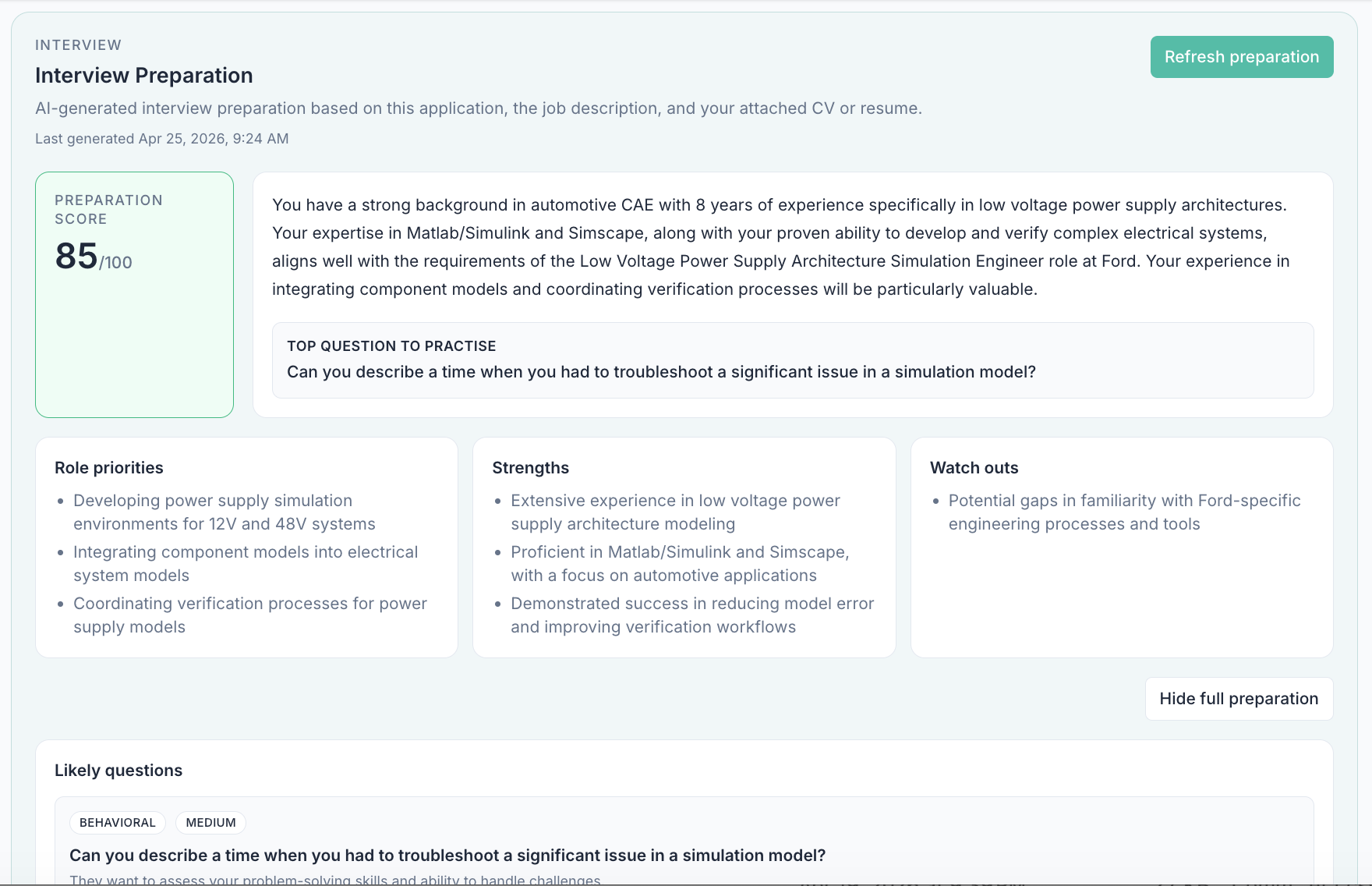
Actual product screen. Open full size to read it; suggested questions and preparation scores are guidance, not predictions of what an interviewer will ask.
Why it helps
Generic interview prep only gets you so far
Most interview prep starts with vague questions and generic advice. ApplyArc starts from the actual role, your saved job description, and the context you have already collected during your search.
Prep from the real job description
Use the responsibilities, requirements, and keywords from the role you saved, rather than relying on generic interview prompts.
Focus on what matters most
See likely question areas, role priorities, risks, and the points you should be ready to explain clearly.
Keep prep connected to the application
Your interview notes, recruiter conversations, saved role, and next steps stay attached to the same application.
Walk in with better questions
Generate thoughtful questions to ask the interviewer based on the role, company context, and what still needs clarifying.
What you get
A practical interview briefing
ApplyArc gives you a structured prep pack you can actually use before a recruiter screen, hiring manager call, panel interview, or final round.
- Likely questions based on the role
- Suggested answer strategies and talking points
- Strengths to highlight
- Risks or gaps to prepare for
- Smart questions to ask the interviewer
- A final checklist before the interview
Example output
From job description to interview plan
Likely question
Tell us about a time you led a cross-functional project with competing priorities.
Why they might ask
The role emphasizes stakeholder management, delivery ownership, and balancing commercial and operational priorities.
How to answer
Prepare a concise example with context, your decision-making process, measurable outcome, and what you learned.
How it works
How to use AI for interview practice
Start with the real role, generate questions from its requirements, prepare examples from your own experience, and use the job context to focus your practice on what the interview is actually likely to test.
Start with the real job
Save the application and its real job description so your practice is grounded in the role.
Generate role-specific questions
Use the responsibilities and requirements to focus on questions the interview is likely to explore.
Prepare examples from your resume
Choose evidence from your resume and experience that answers what the role actually needs.
Practice against the role
Refine your answers, talking points, risks, and questions to ask using the saved job context.
Turn one prompt into an answer from your experience
Fictional practice example for a Customer Success Manager interview: "Tell me about a difficult customer launch." Use the prompt to prepare your own evidence, not to memorize an invented answer.
- Choose a real launch you worked on. Note the problem, your responsibility, the actions you took and the outcome you can support.
- Practice aloud. Check whether your answer demonstrates the ownership and customer judgment required by this role; remove unsupported details.
- Keep a short reminder with your preparation and a question to ask, such as how the team handles a delayed launch. Revisit unresolved points before the next round.
Before a later round, return to your notes and prepare for what is still unresolved. Use the free interview tracker to keep dates, interviewers and follow-ups together.
Use cases
Useful before every kind of interview
Whether you have a first recruiter screen or a final hiring manager conversation, ApplyArc helps you return to the role with the right context.
Recruiter screens
Quickly review the role, key requirements, salary notes, and why your background fits.
Hiring manager interviews
Prepare stronger examples, role-specific talking points, and questions about expectations.
Final rounds
Review risks, gaps, decision points, and the most important questions to ask before accepting.
Your tracker should help you get hired, not just stay organized
ApplyArc helps you track applications, manage follow-ups, keep recruiter emails tied to the right role, compare your resume against the job, and prepare for interviews from the context already saved in your search.
No credit card required. Privacy-first from day one.
Interview prep FAQs
Is Interview Prep a separate tool?
No. Interview Prep is included inside ApplyArc, so it can use the application, job description, notes, and role context already saved in your tracker.
Can I use it without a job description?
It works best with a saved job description. That gives ApplyArc the role-specific context needed to generate useful questions and talking points.
Does it use my resume?
Yes, when a resume is linked to the application and its text has been extracted. Prep can use that text alongside the job description and notes. Without it, examples based on your experience will be less specific.
Is this just generic AI interview advice?
No. The goal is practical, role-specific prep based on the application you are actually managing inside ApplyArc.