How ApplyArc works

ApplyArc is the operating system for your job search. It helps you bring structure to the roles you are pursuing, the conversations around them, the follow-ups that keep momentum going, and the job saves that start in your browser.

The basic idea

Most job search tools help you record that you applied. ApplyArc is built to help you manage everything around that application, the job description, your notes, recruiter communication, next steps, and the overall state of your search.

The hardest part of a job search is not applying. It is managing everything that follows.

01

Save the role

Add a role in seconds by pasting a link or saving it directly from the ApplyArc Chrome extension. ApplyArc keeps the full job description attached to the application so you always have the original context close by.

02

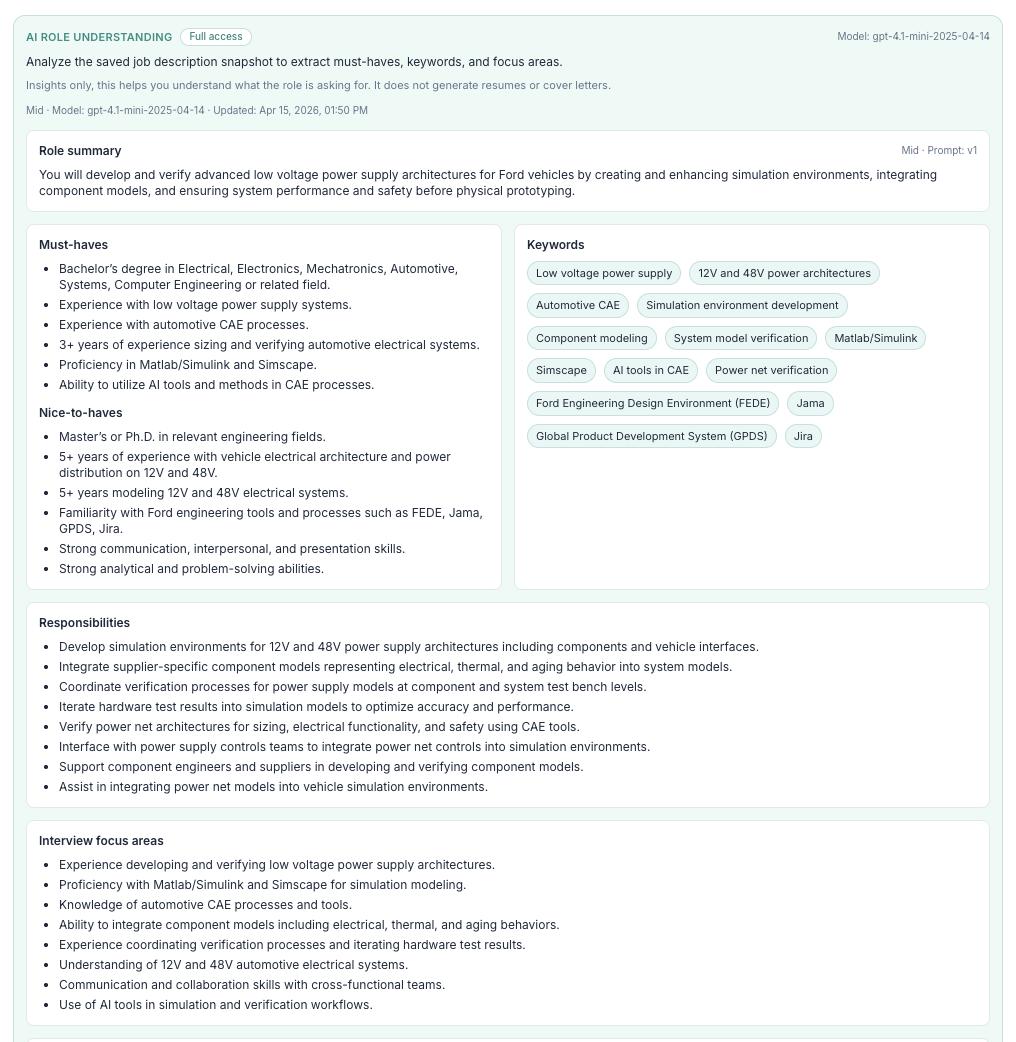
Understand what matters

ApplyArc helps you quickly see the summary, must-haves, and keywords so you can decide whether the role is worth pursuing and how to tailor your approach.

ApplyArc showing role summary, must-haves, and keywords for a job

Use the Chrome extension when you find a role worth keeping

ApplyArc is not just for roles you have already applied to. The extension lets you save jobs directly into your workspace while you browse, so interesting roles do not get lost in open tabs, bookmarks, or vague memory.

  • Save jobs directly from the browser.
  • Keep the job description tied to the role from the start.
  • Decide later whether to apply, tailor, or revisit.
Browser to tracker

See a role, save it, understand it, and track it, without rebuilding the context later.

03

Track the application properly

Move each role through your pipeline, from saved to applied to interview to offer. Keep notes, decisions, and relevant context attached to the application instead of scattered across tabs, documents, and inboxes.

04

Stay on top of follow-ups

The real challenge is not just applying. It is managing everything that follows. ApplyArc helps you keep track of recruiter conversations, next steps, and follow-ups so opportunities do not quietly go cold.

05

Keep the right materials with the right role

Job searches get messy fast when resumes or CVs, notes, and edits start drifting away from the roles they belong to. ApplyArc keeps those details tied to each application so you can stay organized and intentional.

06

See the whole process clearly

Instead of reacting role by role, you can see your search as a system. That gives you a better sense of what is active, what needs attention, where momentum is building, and where to adjust your approach.

Dashboard view

Track progress without losing context

Once a role is in your system, ApplyArc gives you a clear view of where it stands. Notes, next steps, and application state stay together, so you can stop rebuilding the story every time you come back to your search.

ApplyArc dashboard showing a priority action card and application workflow

What this looks like in practice

  • You always know which roles are active and which are drifting.
  • You can see where to follow up and where to wait.
  • You keep the right resume or CV context tied to the right role.
  • You spend less time reconstructing what happened and more time moving forward.

Who ApplyArc is for

ApplyArc is built for people running an active job search, especially when multiple roles, recruiter threads, and resume or CV versions are in play at the same time.

It is for people who want more clarity and control, not more noise.

Ready to get started?

Create your account, explore pricing, or use the extension to start saving roles into ApplyArc.