
Recommended next step
Add a company firstFree Google Sheets and Excel template
Free job application tracker spreadsheet for Google Sheets and Excel
Download the free Excel tracker or make your own editable copy in Google Sheets. Start with company, role and status, then add a follow-up date and a next step as your search progresses.
Free spreadsheet
Get the free Google Sheets or Excel template
Make your own editable Google Sheets copy or download the Excel workbook. Both are free and require no ApplyArc account. Saving an editable Google Sheets copy requires a Google account.
Prefer tracking in your browser?
Try the online tracker
Start immediately with no signup. It autosaves in your browser and turns dates and statuses into clear next actions.
Use the online trackerEvery option is free. The online tracker saves on this device, and the spreadsheet templates remain yours.
A look inside the spreadsheet
The current Excel template is shown below, with its first eight columns. Both versions have the same 16 columns, follow-up indicators and dashboard. Start in row 6. On narrow screens, swipe across the preview to see more.
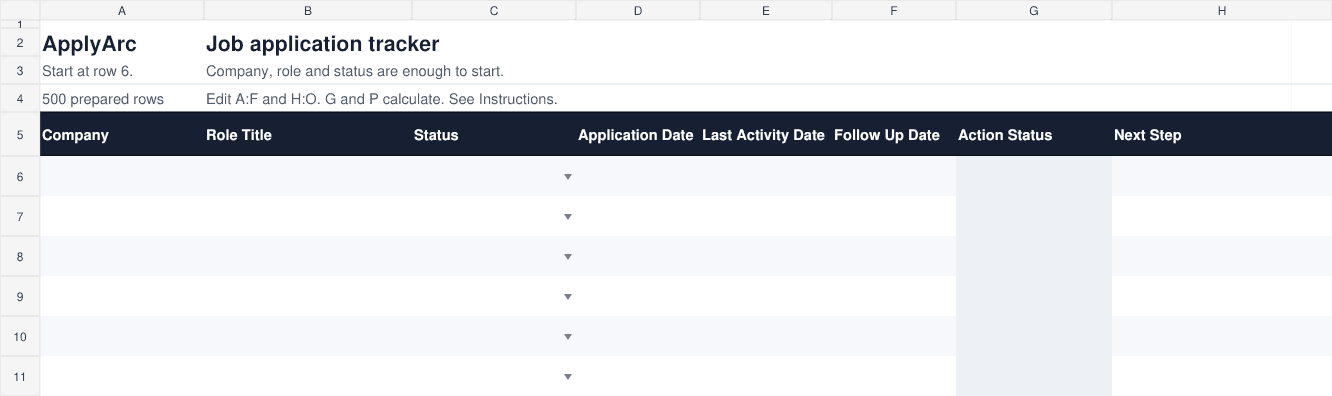
The templates prepare 500 rows. Company stays visible while you scroll. Google Sheets has been checked in a desktop browser. Hands-on checks in Microsoft Excel, the mobile apps and iPhone Safari remain outstanding.
See the difference
Northstar Analytics, Product Manager
Applied 9 days ago
The spreadsheets flag due follow-ups. The online tracker also keeps your notes and next actions together.
Free online tracker
Start tracking in seconds
Enter a real application below. ApplyArc turns the dates and status into a recommended next step as you go.
No signup required. It autosaves on this device, and you can export your data anytime.
Live tracker
Your free tracker is ready
Add one application below. ApplyArc will work out what needs your attention next. Use Tab to move across the spreadsheet.
Autosaves in this browser as you type
Recommended next step
Add a company firstMore details
Recommended next step
Add a company firstMore details
| # | Company | Role | Status | Applied | Recommended next step | Notes | Job link | Salary | Row controls |
|---|---|---|---|---|---|---|---|---|---|
| Example | Northstar Analytics | Product Manager | Applied | 9 days ago | Follow up soon | Ask Maya about timing | Job posting saved | $120k | |
| 1 | Add a company first | ||||||||
| 2 | Add a company first | ||||||||
| 3 | Add a company first |
Tip: use Tab to move across the desktop tracker. Your tracker is autosaved on this device. Save it to a free account to use it across devices.
Want to keep what you entered?
Create a free account and any applications entered above will be moved into ApplyArc. You will not need to enter them again. You can then use your tracker across devices and unlock reminders, recruiter email matching, resume or CV versions, and interview preparation.
Job application tracker spreadsheet for Google Sheets and Excel
This free job application tracker spreadsheet template is designed for job seekers who want a simple way to organize applications, track follow-ups, manage recruiter contacts, monitor interview progress, record resume or CV versions, and see which applications need action.
What both spreadsheet versions include
A useful job application tracker should do more than list company names. It should help you remember where each application stands, who you spoke to, what needs to happen next, which version of your resume or CV was submitted, and whether the application still needs action.
| Column | Purpose |
|---|---|
| Company | Employer name. Start here in row 6. |
| Role Title | The exact role title. |
| Status | Choose the current stage from the dropdown. |
| Application Date | When you applied. |
| Last Activity Date | When you last applied, followed up or heard back. |
| Follow Up Date | Choose your next check-in date. |
| Action Status | Calculated: overdue, due today, scheduled, stale or closed. |
| Next Step | One specific action to take next. |
| Job Link | The original posting URL. |
| Recruiter / Contact | Contact name and how to reach them. |
| Notes | Interview dates, research, work style and other context. |
| Priority | Optional High, Medium or Low dropdown. |
| Resume/CV Version | The exact file or version you submitted. |
| Source | Where you found the opportunity. |
| Salary Range | Listed or expected salary, in your own currency. |
| Days Since Activity | Calculated from last activity, falling back to when you applied. |
Status options in both spreadsheet versions
The template uses simple application statuses so your job search does not become harder to manage than it needs to be.
WishlistAppliedRecruiter ScreenInterviewFinal RoundOfferAcceptedRejectedWithdrawn
Google Sheets job tracker vs Excel job tracker
Google Sheets
Open the template, choose Make a copy and save it to your own Google Drive. A Google account is needed to keep an editable copy. Add one row per application, then update its status and follow-up date as your search progresses.
- Best for simple tracking
- Your own copy in Google Drive
- Good for sharing with a partner, coach, or mentor
Excel
Download the .xlsx workbook, open it in Excel and save a working copy before adding applications. Use the Status and Follow Up Date columns to decide what needs attention next. Keep the job link and notes with the same row for later review. Both versions start empty, with labeled examples in Instructions and the same 16 tracker columns. For Google Sheets, choose Make a copy to save your editable version.
- 16 columns, with the everyday fields first
- Saved as a local .xlsx file
- Dropdowns, filters and follow-up indicators
Useful spreadsheet formulas for job tracking
Both spreadsheet versions calculate Days Since Activity and Action Status. If you want to customize your own tracker further, these formulas can help you track application volume, interviews, offers, rejections, and timing.
Count tracked jobs
=SUMPRODUCT(--(Tracker!A6:A505<>""))Counts filled company rows, including saved opportunities.
Count current interviews
=SUM(Dashboard!E8:E10)Counts current recruiter screens, interviews and final rounds, not historical interview conversion.
Count offers awaiting a decision
=COUNTIFS(Tracker!A6:A505,"<>",Tracker!C6:C505,"Offer")An offer stays active until you accept or close it.
Review due follow-ups
=COUNTIF(Tracker!G6:G505,"Overdue")+COUNTIF(Tracker!G6:G505,"Due today")Counts rows with a due or overdue chosen follow-up date.
How to use the spreadsheet effectively
1. Add every role immediately
Add the role as soon as you apply or decide it belongs on your wishlist. Waiting until later is how job searches become messy.
2. Set a follow-up date
For most applications, a follow-up 7 to 10 days after applying is a reasonable reminder point. The spreadsheet includes a follow-up date field so you can see what needs attention.
3. Update the last activity date
Whenever you apply, follow up, interview, or hear back, update the last activity date. This keeps the days since activity and Action Status fields useful.
4. Track recruiter conversations
Record recruiter names, email addresses, and notes so you do not lose context when a company responds weeks later.
5. Record your resume or CV version
If you tailor applications, track which version you submitted. This helps when preparing for interviews and follow-ups.
6. Review Action Status weekly
Use the Action Status field to spot applications that need a follow-up, a status update, or closure.
Common job tracking mistakes
Forgetting follow-ups
A tracker is only useful if it tells you what needs attention. Follow-up dates and Action Status are two of the most important parts of the template.
Not tracking contacts
Recruiter conversations often happen outside the job board. Store contact details so you can reconnect quickly.
Using vague statuses
Statuses like open or pending are not always helpful. Use statuses that show the real stage of the application.
Losing interview notes
Interview notes, questions, and next steps should live beside the application, not in a separate document you may forget.
Not tracking resume versions
If you tailor your resume or CV, record which version you used for each application so interview preparation is easier later.
Not closing old applications
Keep the Status field current so your active pipeline reflects roles that are still worth tracking.
When a spreadsheet stops being enough
A spreadsheet is a good starting point. It is free, familiar, and flexible. But as your search grows, the manual work starts to become part of the problem.
- Follow-ups are easy to miss without reminders.
- Recruiter emails live separately from the application.
- Resume and CV versions become hard to track.
- Cover letters and notes get scattered across files.
- Interview notes get scattered across documents and emails.
- It becomes harder to see which applications need action.
The spreadsheet can support an ongoing job search on its own. Moving to ApplyArc is optional, whenever its connected tools would help.
Spreadsheet vs ApplyArc
Many job seekers start with a spreadsheet and move to ApplyArc when they want reminders, resume or CV scoring, email tracking, recruiter conversation history, and a more complete job search workflow.
| Feature | Spreadsheet | ApplyArc |
|---|---|---|
| Track applications | Yes | Yes |
| Google Sheets or Excel | Yes | Not needed |
| Status tracking | Manual | Yes |
| Priority tracking | Manual | Yes |
| Follow-up dates | Manual | Automatic reminders |
| Resume or CV version tracking | Manual | Yes |
| Cover letter tracking | Use Notes | Yes |
| Recruiter contact tracking | Manual | Yes |
| Recruiter email tracking | Manual | Yes |
| Fit scoring | Not included | ATS and recruiter scoring |
| Visual job pipeline | Stage counts and filters | Yes |
| AI follow-up help | No | Yes |
| Import existing spreadsheet | Not applicable | Yes |
Moving from a spreadsheet to ApplyArc
You can import core fields into ApplyArc when you choose. Review the import preview before saving, and keep your workbook for contacts and follow-up dates.
- Clean up any blank or test rows in your spreadsheet.
- Make sure each active role has a company and job title.
- Create a free ApplyArc account.
- Import your spreadsheet.
- Set follow-up reminders for active applications.
- Keep future applications in one source of truth.
Frequently asked questions
Is this job application tracker spreadsheet free?
Yes. You can download the template for free and use it without creating an ApplyArc account.
Does it work in Google Sheets?
Yes. Select Use in Google Sheets, then choose Make a copy to save an editable version in your own Google Drive.
Does it work in Excel?
The .xlsx is designed for Excel and uses standard formulas, dropdowns and filters. Hands-on checks in Microsoft Excel desktop and mobile remain outstanding.
Can I customize the columns?
Yes. Back up the workbook first and update any formulas and validation that depend on changed columns.
What is the best way to track job applications?
The best system is the one you will keep updated. A spreadsheet is a good start. A dedicated tracker is better when you need reminders, email tracking, resume or CV scoring, recruiter conversation history, and interview notes in one place.
Can I track resume and CV versions in this template?
Yes. The template includes a Resume/CV Version column so you can record which version you used for each role.
Does the template show which applications need action?
Yes. The template includes follow-up and activity fields that help you spot applications that may need attention.
Related guides and features
Ready to move beyond a spreadsheet?
Use ApplyArc to track applications, recruiter conversations, resume or CV versions, follow-ups, interview notes, and next steps in one place.