How to Organize Job Search Emails
Use a simple system to organize recruiter emails, interview invitations, application updates, and follow-ups without losing the connection to each job.
The best way to organize job search emails is to connect each important message to the relevant application, then turn anything requiring attention into a dated action.
Folders and labels help, but they do not tell you what a message means or what you need to do next.
Start with four email categories
| Category | Examples | Action |
|---|---|---|
| Confirmation | Application received, account created | Attach to the application, no reply needed |
| Conversation | Recruiter questions, scheduling, requests | Reply and record the next step |
| Interview | Invitations, participant details, preparation | Add the interview and save the details |
| Outcome | Rejection, withdrawal confirmation, offer | Update the application stage |
Newsletters and job alerts can remain separate because they are discovery messages, not updates to an active application.
Use email labels without creating one for every company
A separate folder for each employer becomes difficult to maintain. Use a small set of labels such as:
- Job search, action needed
- Job search, interview
- Job search, waiting
- Job search, completed
The application tracker should hold the company-specific history. Email labels should help you process the inbox.
Match messages using multiple clues
The sender's domain is helpful, but it is not enough. Recruiting platforms often send email on behalf of many employers, and company names can differ from their domains.
Use several signals together:
- Company name in the sender, subject, or message
- Exact or similar job title
- Recruiter name
- Application or requisition identifier
- Recent applications at that employer
If the company and title both match one active application, confidence should be high. If only a generic sender matches, confirm manually rather than attaching the message to the wrong role.
Turn email into the next action
After reading a meaningful message, decide whether it requires a reply, stage update, interview, follow-up, or no action. Record the action with a date before archiving the email.
For example, an interview invitation should update the application to Interview, create the meeting, preserve the participant information, and prompt preparation. A rejection should close the application, not suggest moving it forward.
Use a weekly inbox check
Once a week, search for job-related messages that are still unmatched or require action. Look for common subject terms such as application, interview, opportunity, next steps, update, and offer.
The goal is not an empty inbox. It is confidence that no important application update is disconnected from your search.
ApplyArc's recruiter email tracker lets users forward job search email into their workspace so messages can be matched with applications. You can also read how to organize recruiter emails during a job search and when to follow up.
What connected recruiter email looks like
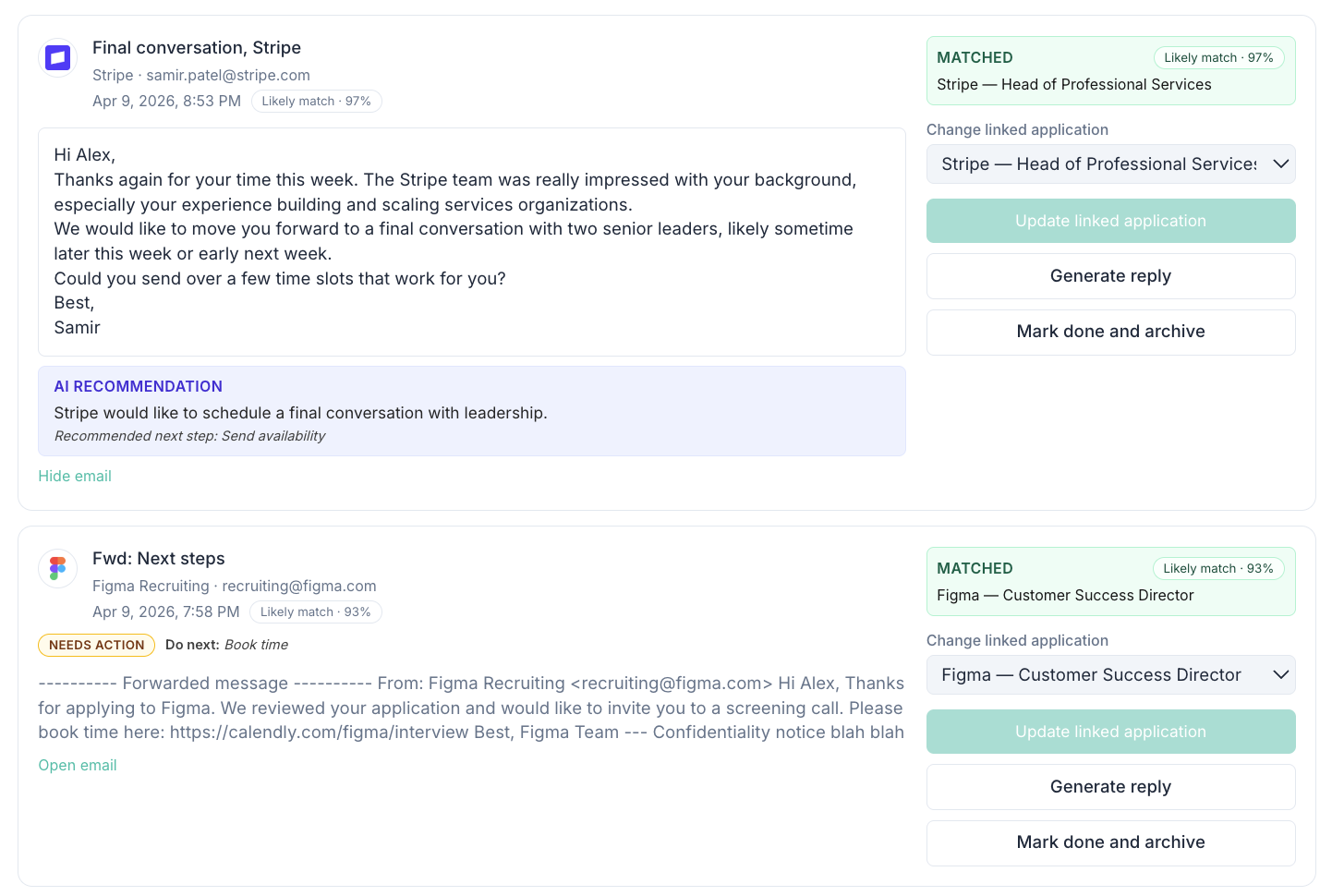
A forwarded message stays connected to its application, match confidence, and next action. Select the screenshot to open the full-size view.